Screen out participants on Prolific, and draft panels with your AI agent
Prolific panels now support screen-out logic, with the required screen-out payments budgeted and paid for you, and the Versive Assistant and MCP server can draft Prolific and Respondent panels for you to review and publish.
Prolific's filters are great for the basics, like country, age, or employment status. But most studies also need to qualify people on something Prolific doesn't track: "manages a team of five or more," or "switched banks in the last year." That takes a screener question inside your study, and until now Prolific panels in Versive couldn't use screen-out logic at all.
Two updates make recruiting through Versive more flexible: screen-outs on Prolific, and panels your AI agent can set up for you.
Screen out participants on Prolific
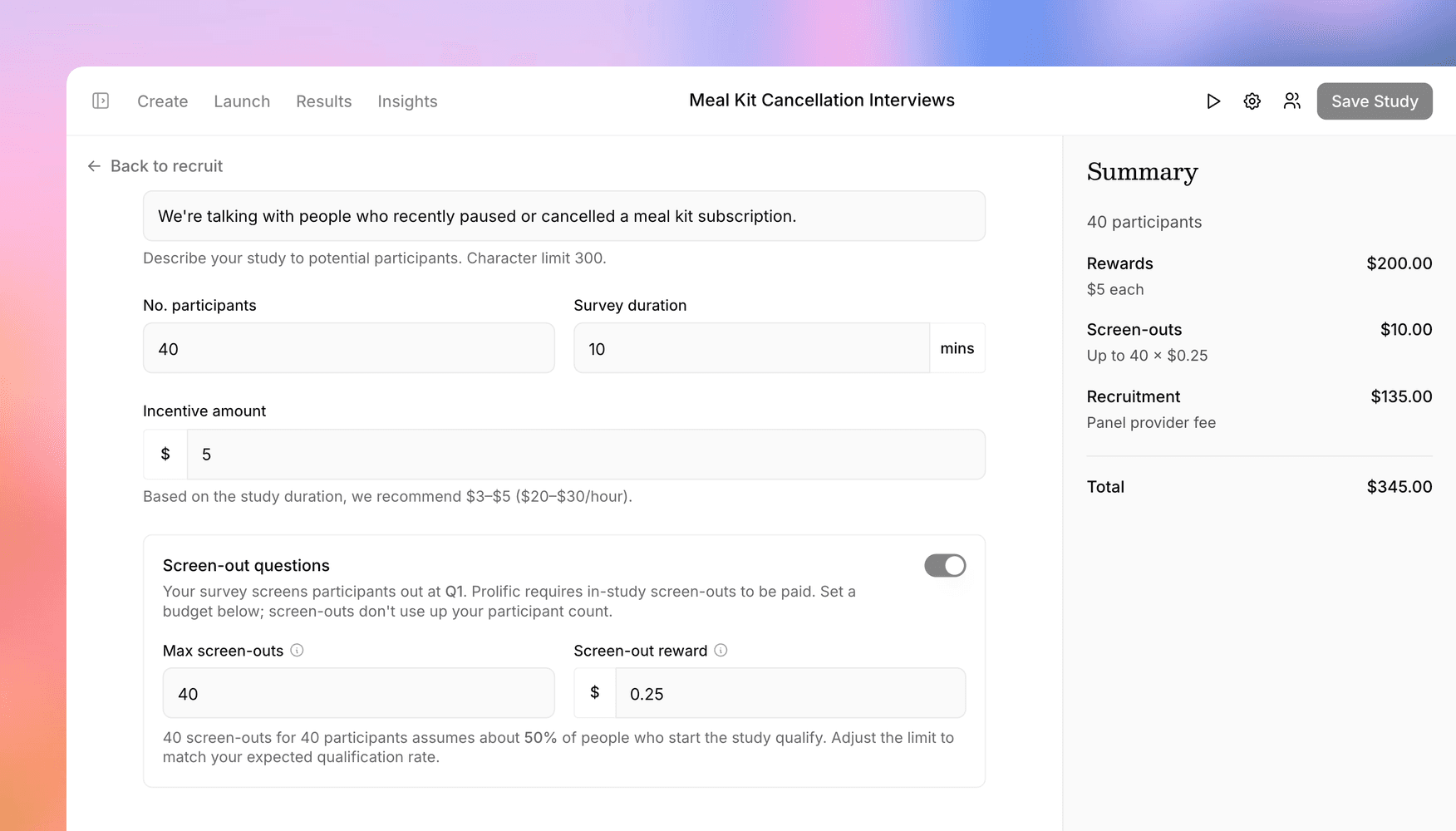
Prolific requires a small payment for anyone who starts your study and gets screened out, since they've already spent time on it. Versive now handles that end to end. When your study has screen-out logic, the Prolific setup turns on screen-out payments automatically and asks for two numbers:
- Screen-out reward: a fixed amount paid automatically to each screened-out participant. It defaults to $0.25, and you can raise it if your screener takes a while to get through.
- Max screen-outs: how many paid screen-outs to budget for. Versive shows the qualify rate your budget implies, so you can sanity-check it: 20 screen-outs for 20 participants assumes about half of the people who start will qualify.
The screen-out budget is part of the checkout total, and any unused budget is refunded when you close the project. Screened-out participants don't use up your study places, and they show up as Screened out in the panel's submissions, with a running count against your limit.
If more people screen out than you planned for, Prolific pauses recruiting and Versive emails your team. Add more screen-out slots from the panel's Submissions tab, and recruiting resumes as soon as you've paid. The reward itself is fixed once a panel is published, and Prolific panels still can't use redirect logic, since the integration controls where participants go when they finish.
Screen-out rules themselves work the way they always have: add one to any question in the builder, or ask the Versive Assistant to "screen out anyone who doesn't manage a team."
Let your agent draft the panel
Setting up a panel means a lot of small decisions: which filters, how many people, what to pay, what it will cost. Now you can describe what you want and let an agent do the setup. Open the Versive Assistant on any study and ask something like:
Recruit 50 adults in the US who work full time on Prolific, $8 for 10 minutes.
The Assistant reads your study, searches the provider's targeting options, checks how many participants match, and shows you the plan with a cost estimate. Once you confirm, it creates a draft panel on the study's Recruit tab, with screen-out payments included if your study screens people out. You can keep refining it in conversation ("make it 75 people," "add a filter for parents") or open it in the panel setup to finish by hand.
It works for both of our panel providers:
- Prolific for consumer audiences, with its full filter catalog and live eligibility counts
- Respondent for B2B audiences, with job titles, skills, industries, and screener questions
The same tools are available in the Versive MCP server, so Claude, ChatGPT, Cursor, or any other MCP client can draft panels too, or answer "which of our panels are still recruiting?" across your whole organization.
You approve every dollar
Agents only ever create and edit drafts. Paying and publishing always happen in your Versive dashboard, where you review the audience and cost and choose Pay and publish yourself. No tool can charge your card or put a study in front of participants, and only teammates who can manage a study can create panels for it.
You'll find panels on your study's Launch > Recruit tab, and the recruiting docs cover screen-outs and the Assistant in detail.
Get in touch
We're continuing to build features that help you learn faster. If you have any questions or feature requests, reach out to us at [email protected]. Want to give it a try? Create a free account, no credit card required.

Eric Li, Co-Founder, Versive