Add images, videos, and prototypes to your studies from chat
Attach a file in the Versive Assistant or an AI app like Claude, and tell it which question it belongs on.
The Versive Assistant and AI apps connected through the Versive MCP server can already draft a study for you. But most studies also need something for participants to react to, like a concept board or a prototype. Until now, that meant leaving the chat, finding the right question in the builder, and uploading the file yourself.
Now you can hand the file over in the same conversation. Attach an image, video, or PDF, or paste a Figma prototype link, and tell the Versive Assistant or your AI app which question it belongs on.
Attach files in the Assistant
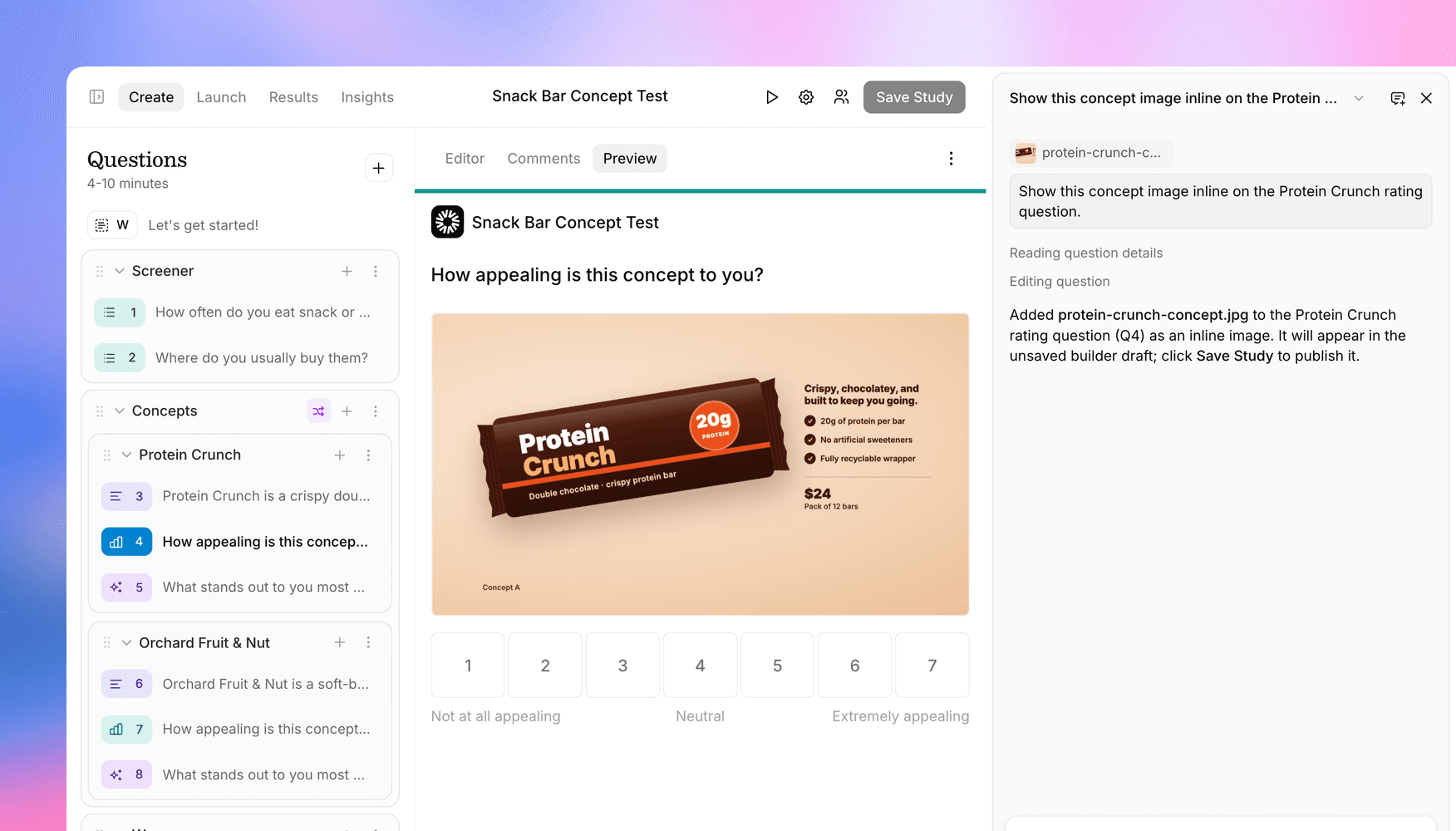
The Assistant's chat box now has buttons for images, videos, and PDFs. If you're running a concept test and have the packaging mockup for one of the concepts, attach it and ask:
"Show this concept image inline on the Protein Crunch rating question."
The image shows up on that question in the editor right away, and like any other change the Assistant makes there, nothing goes live until you click Save Study. The Assistant also writes a short description of each image, so the AI interviewer knows what participants are looking at when it asks follow-ups.
It handles more than images. Paste a Figma prototype link to show the prototype next to a question or to set up a Prototype Task, or paste a website link to show the site. You can also ask it to reuse media you've already added ("use the same image from Q1 on Q4"), and videos can autoplay or loop if you'd like.
Attach files from Claude, ChatGPT, and other AI apps
Building from an AI app works a little differently, because Claude and ChatGPT don't pass the files you share with them on to connected tools like Versive. When you ask one to add an image to a question, it gives you a Versive upload link instead. Open it, choose the file, reply "uploaded," and your app picks up where it left off. Coding agents like Claude Code and Cursor can upload the file themselves after checking with you.
AI apps can now also create Prototype Tasks from a Figma link, and set up display logic as well as branching (display rules are new in the API too). Prototypes added from a link are embedded as they are, so to set a goal screen, get heatmaps, or give the AI interviewer a summary of where participants clicked, import the prototype from Figma in the builder.
Files you attach in chat can be up to 50 MB each. The question media docs list the supported file types and which questions they work on, and the MCP tools reference covers uploads from AI apps.
Get in touch
We're continuing to build features that help you learn faster. If you have any questions or feature requests, reach out to us at [email protected]. Want to give it a try? Create a free account, no credit card required.

Eric Li, Co-Founder, Versive