What's new: Matrix Selection, smarter follow-ups on prototypes and websites, and more
A new Matrix Selection question, AI follow-ups that know what participants did on your prototype or website, "any" display logic, more flexible Allocation questions, and more.
A roundup of what we've shipped over the past week, from a new survey question type to smarter follow-ups on prototype and website tests.
Matrix Selection
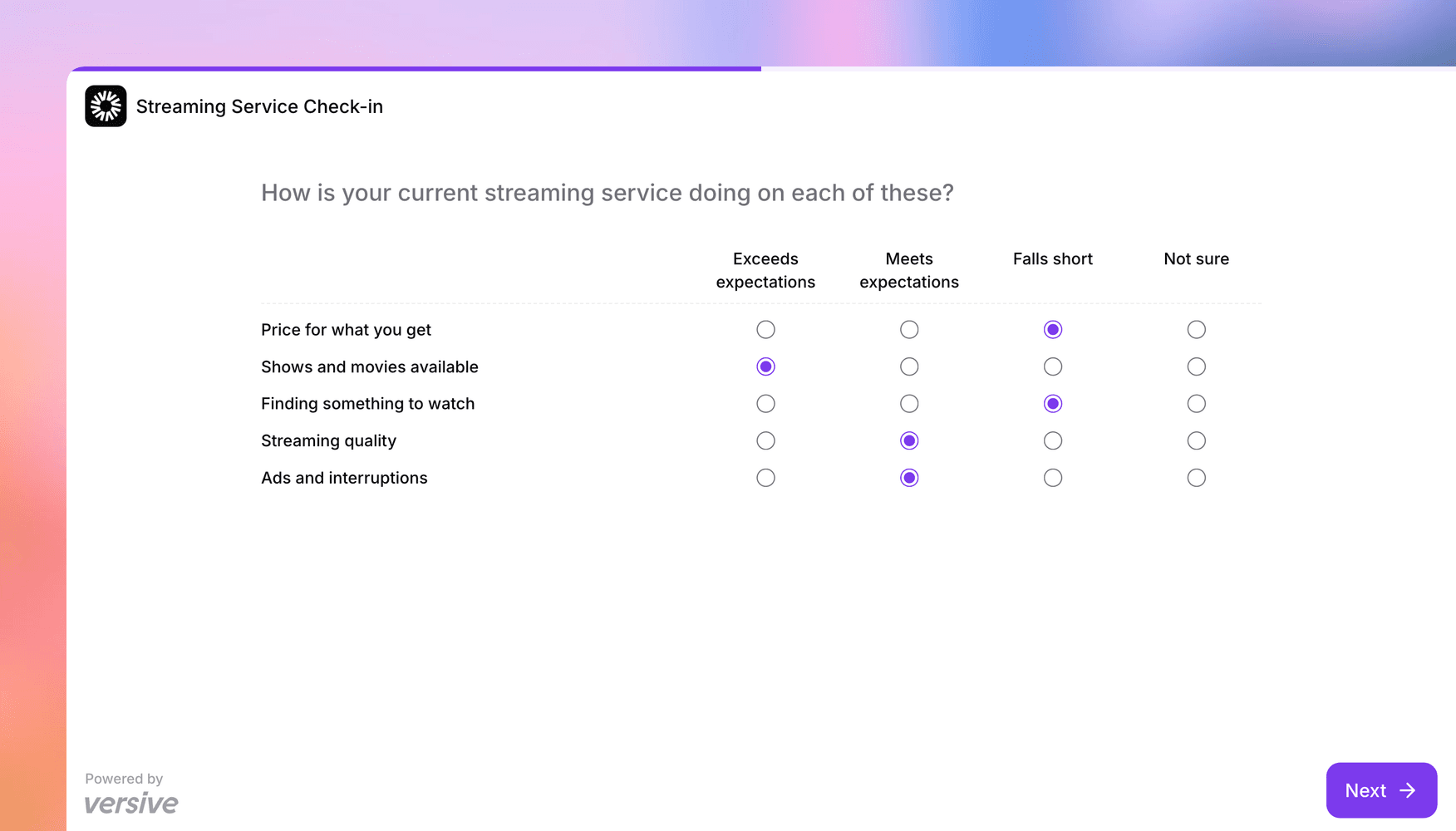
Satisfaction surveys often ask the same thing about several parts of a product, like how a streaming service does on price and on ads. Asked one at a time, that's a string of near-identical screens. Matrix Rating Scale puts them on one screen, but only when the answers are numbers.
Matrix Selection is for when the answers are labels. Rows are the things you're asking about, columns are the answer choices, and participants pick an answer in each row. Ask "How is your current streaming service doing on each of these?" with a row for price, one for streaming quality, one for ads, and so on, and answers that run from "Exceeds expectations" to "Falls short."
Choose Grid to show a radio button for each answer, or Dropdown to give each row its own menu, which keeps longer answers readable. On phones, the grid stacks each row's answers. Rows can be randomized, and if the question is optional, participants can answer just the rows that apply to them.
When more than one answer can apply, like which devices someone watches each service on, turn on Multi selection and participants get checkboxes instead.
Results show how answers split for each row, and the CSV export has a column for each row (or, with Multi selection, for each row and answer). On single-answer questions, you can also show a later question based on one row's answer, so you only ask why to the people who said price falls short. Matrix Selection works in the builder, with the Versive Assistant, in the API, and over MCP. Filtering results by a row's answer isn't available yet.
Follow-ups that know what participants did
When participants try a prototype or a website during an interview, the best follow-ups are about what they actually did: the page they kept going back to, or the button they tapped that did nothing. Until now, the AI interviewer only knew where they started.
Now, on an AI Question or an Exploratory question, it gets a summary of each participant's path. On a Figma prototype, that covers the screens they opened, how long they stayed on each, and how many of their clicks hit something that doesn't respond. On a website shown in the virtual browser, it covers the pages they opened, how long they stayed, and a short description of what each page shows. Either way, a follow-up can now sound like "You went back to the pricing page a few times. What were you looking for?"
This works in text, voice, and video interviews. Prototypes need to be imported from Figma in the builder, since the summary relies on their screen names. Versive describes each website page the way a signed-out visitor sees it, so pages behind a login won't be described, and website summaries don't run in Realtime AI studies yet. Other prototype tools, like Figma Make or Lovable, aren't covered. The prototype testing and question media docs have the details.
Show a question when any condition is met
Say you want a follow-up for anyone who picked Slack, Teams, or Zoom on an earlier single-choice question. A question with several display conditions used to show only when all of them were met, and since a participant can only pick one answer, a setup like that never showed to anyone.
Once a question has two or more conditions, you can now choose whether it shows when all of them are met or any of them. If you set up conditions that can never all be true at once, the builder warns you and offers to switch to "any" in one click. This builds on the "is not" conditions from last week, and the logic docs cover every option.
More flexible Allocation questions
Not every number fits a simple split of 100 points. Three updates for Allocation and Matrix Allocation questions:
- Min and Max values: with the allocation limit off, set a range every value has to stay within. The Min can be negative, so you can ask how much each budget line will grow or shrink next year, from -100% to +100%.
- N/A cells: in a Matrix Allocation grid, mark the cells that don't apply, like this year's budget for a product that launches next year. Participants see them greyed out, they're left out of the column total, and exports show N/A instead of a zero.
- Blanks count as zero: once the values a participant typed add up to the total, they can move on without typing 0 into every box that's left.
A cleaner Projects page
In a workspace with a lot of folders, the Projects page used to list every one of them before your first project, on every page. Now folders show as a row of cards above your projects, and View all opens the full list a page at a time. Drag a project onto a card to file it there.
Folders are also easier to reorganize. You can move a folder into another folder, so each market or team can have its own space, and select several items to move or delete them at once. If a move would change who can see a project, Versive tells you before it happens. This works on both the Projects and AI Personas pages, and the folders docs explain how access carries over.
Get in touch
We're always building. If you have any questions or feature requests, reach out to us at [email protected]. Want to get started? Sign up today and start running research in minutes.

Eric Li, Co-Founder, Versive